
How to setup IPTV on GSE via Xtream-Codes API?
yestream Engineering
yestream Technical Architecture Desk
In this tutorial, we are going to show you how to bring IPTV channels to your GSE SMART IPTV App. GSE is a comprehensive user-defined Advanced IPTV solutions for live and non-liveTV stream. With a built-in strong player that supports most formats including M3U with options.
It is available in both Android and iOS devices.
We will set IPTV in GSE App using Xtream-Codes API here, also there is another way to set IPTV in GSE App.
How to setup IPTV on GSE via Remote Playlist?
The Advantages of using Xtream-Codes API to setup GSE App:
By using Xtream-Codes API you can add EPG information easily, No need to add the EPG url.
Also EPG auto update available.
If the IPTV provider present Catch-up feature, you will have this option in Xtream-Codes API like MAG portal system.
You can download this app via the link below:
Android devices:
https://apkpure.com/gse-smart-iptv/com.gsetech.smartiptv
iOS:
https://itunes.apple.com/us/app/gse-smart-iptv/id1028734023?mt=8
How to add IPTV channels to GSE using Xtream-Codes API
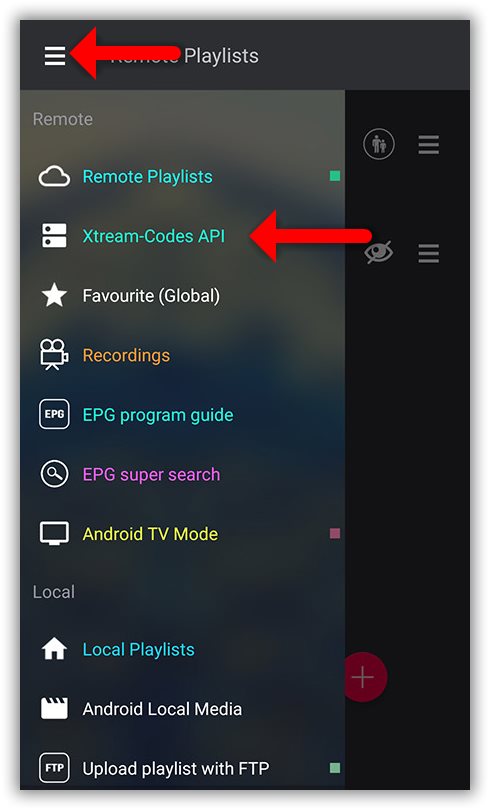
Step 1: Start by downloading the GSE IPTV App from Google Play Store and on the top left you have the options (three lines).
Click on “Xtream-Codes API”.
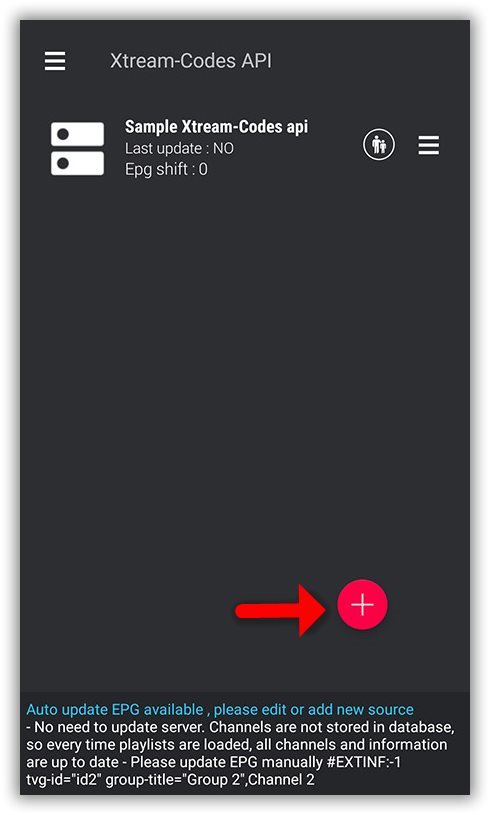
Step 2: On the down right corner click on the red circle.
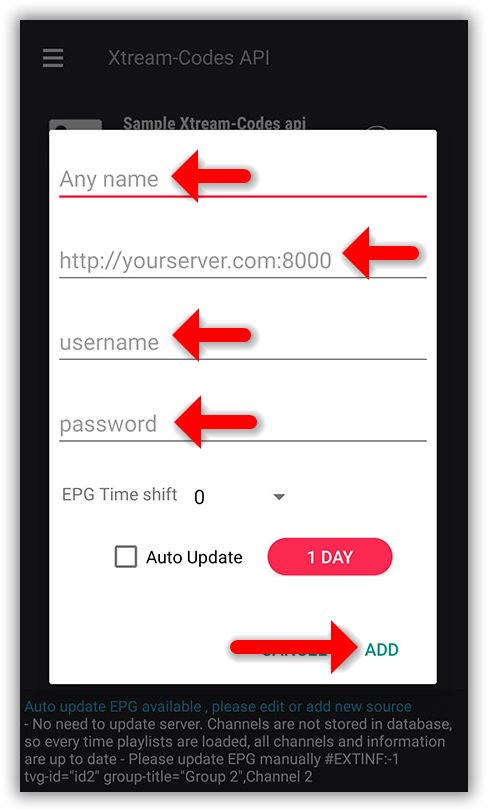
Step 3: Select a name for the IPTV list, you can choose any name for example “MY IPTV”.
Enter Server name, Username and Password , you can find all these details in the M3U url which your IPTV provider send.
After finishing entries click on “Add”.
How to find Server Address, Username and Password?
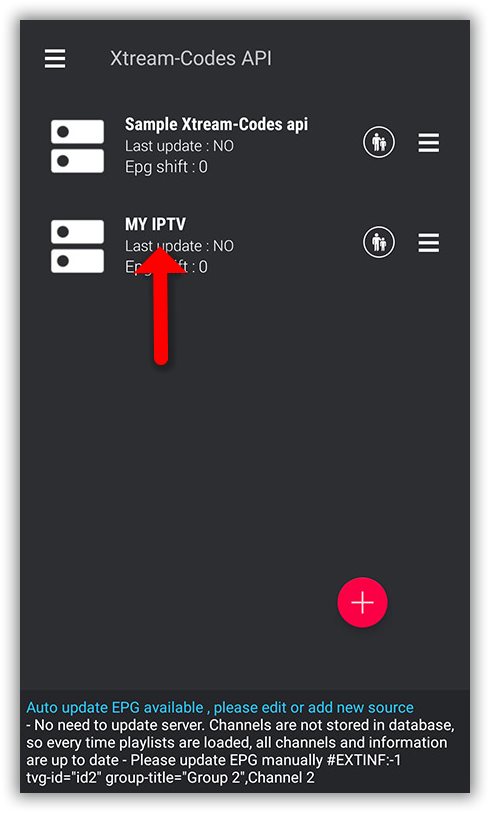
Step 4: Now you will find your “IPTV list” in the menu, click on it.
Step 5: Wait for the channels to be added to your application and this might take a little time depending on which countries or channels groups your M3U file contains.
You will see the LIVE channels and VOD list.
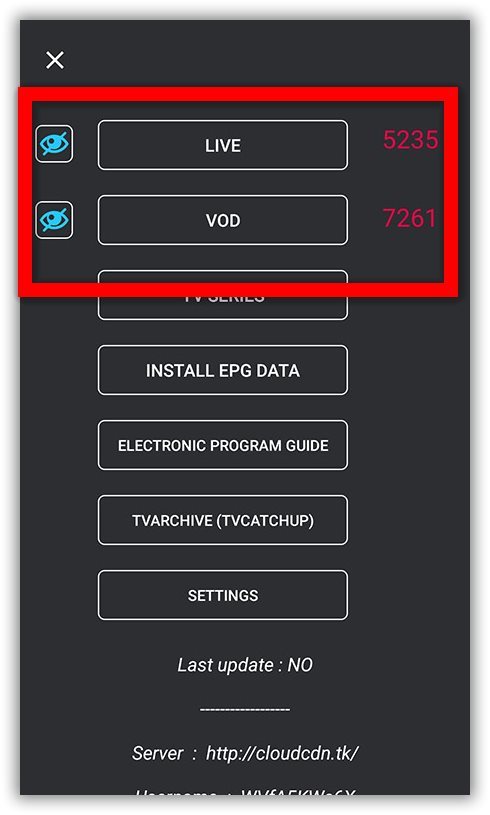
Step 6: By click on LINE you will see the channel groups.
Select the channel that you want to watch and click on “Play”.
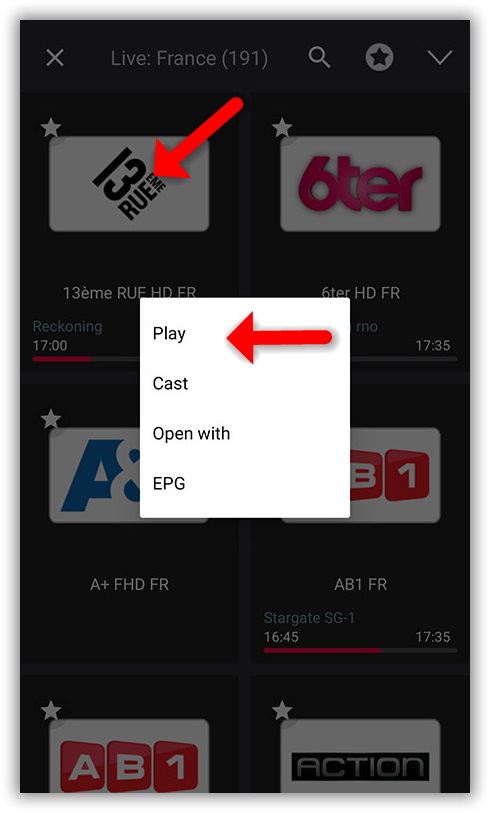
Now you GSE Android app is ready for streaming IPTV channels on your Android device.
How to load EPG in GSE using Xtream-Codes API
Step 1: You can easily add EPG in GSE by clicking on “INSTALL EPG DATA”
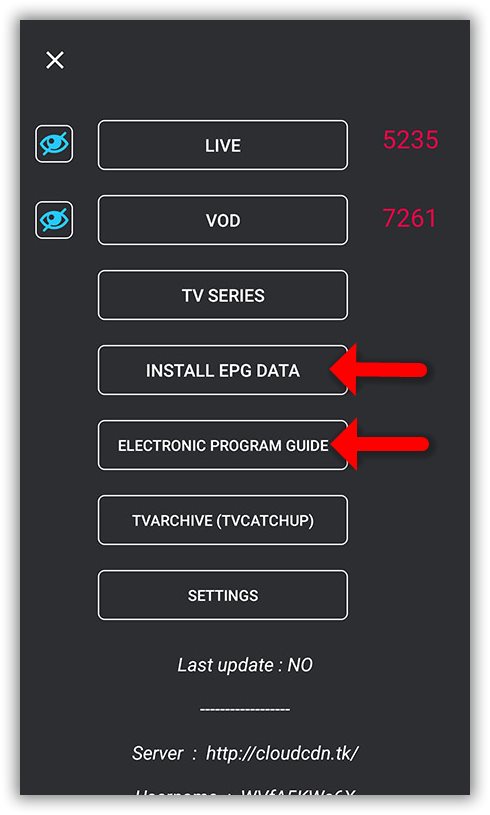
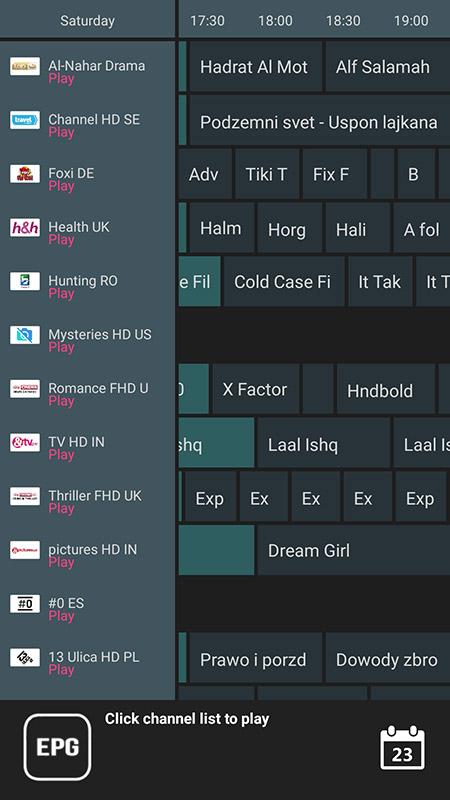
Step 2: Wait until the EPG data downloading after that you can see the EPG list by click on “ELECTRONIC PROGRAM GUIDE” .
Developed by yestream.net
Stream Seamlessly with yestream
Looking for a zero-buffering IPTV subscription for your device? yestream delivers over 25,000+ live 4K/FHD channels, full beIN Sports, Botola Pro Inwi, Sky Sports, and a 120,000+ VOD library with instant WhatsApp activation.
Stream 25,000+ Channels with Zero Buffering
Get full access to live sports, NFL, NBA, 4K Cinema, and trending TV series in 5–15 minutes with instant activation across all your devices.
Related Tutorials & Guides
How to Install IPTV Smarters Pro on Samsung Smart TV (Tizen OS Guide)
Learn how to install IPTV Smarters Pro directly from the Samsung Smart Hub on Tizen OS without sideloading. Step-by-step guide for Xtream Codes login and regional server configuration.
How to Install IPTV Smarters Pro on LG Smart TV (webOS Guide)
Complete walkthrough on downloading IPTV Smarters Pro on LG webOS Smart TVs via the LG Content Store. Configure Xtream Codes API, load 25,000+ channels, and enjoy 4K HDR live sports.
How to Install and Activate IBO Player on Samsung, LG TV & Firestick
Complete guide to downloading IBO Player on LG webOS, Samsung Tizen, and Fire TV. Learn how to locate your MAC address and Device Key, upload playlists online, and unlock 4K streams.