
How to setup IPTV on Perfect Player in Computer?
yestream Engineering
yestream Technical Architecture Desk

Perfect Player is an Android application that simulates a set-top box which can be used for streaming IPTV channels on your favorite devices such as tablets, smartphones, and Smart TV. Please note, this application doesn’t include any IPTV channels. In order to add IPTV channels, you must add your own m3u playlists inside the settings section. What is M3U list?
Perfect Player is available on Android, Linux, and Microsoft Windows.
You can download this app via the link:
http://niklabs.com/downloads/
How to add IPTV channels to Perfect Player on PC?
Step 1: Start by clicking on “Add Playlist” button.
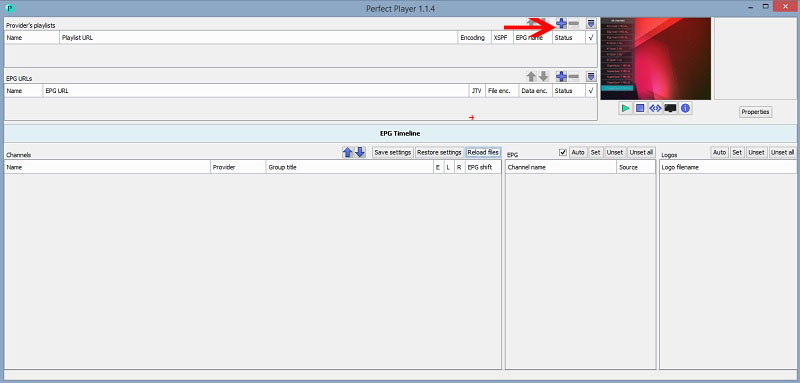
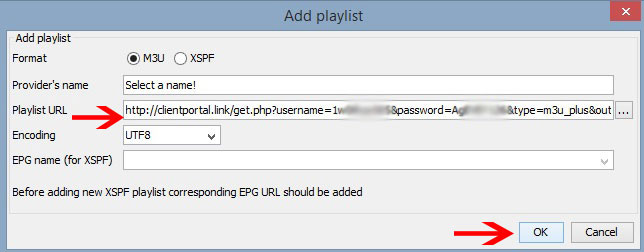
Step 2: Here you must paste your “M3U Playlist URL” which is provided via your IPTV distributor and click on “OK“.
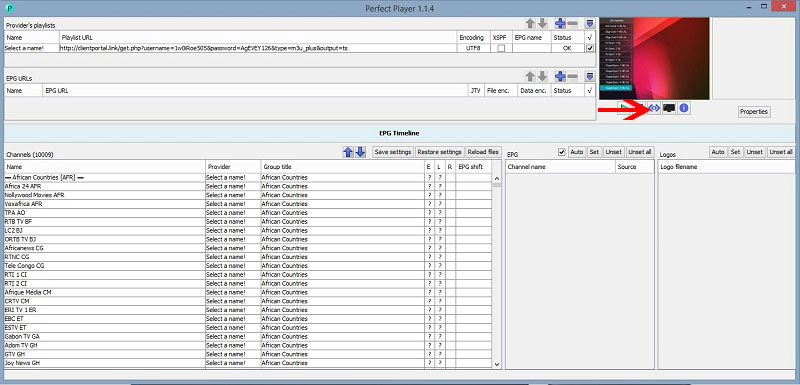
Step 3: Now click on the blue button which is point by the red arrow to bring the list of channels.
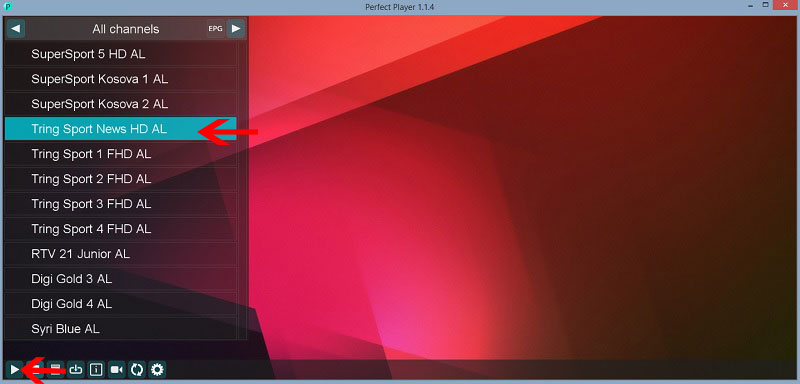
Step 4: Now your playlist is loaded and you can select the channel name and click on “Play” to begin streaming.
If you think need further help, feel free to discuss it with us in the comments section down below.
Developed by yestream.net
Stream Seamlessly with yestream
Looking for a zero-buffering IPTV subscription for your device? yestream delivers over 25,000+ live 4K/FHD channels, full beIN Sports, Botola Pro Inwi, Sky Sports, and a 120,000+ VOD library with instant WhatsApp activation.
Stream 25,000+ Channels with Zero Buffering
Get full access to live sports, NFL, NBA, 4K Cinema, and trending TV series in 5–15 minutes with instant activation across all your devices.
Related Tutorials & Guides
How to Stop IPTV Buffering Forever: 9 Proven Fixes for Smooth 4K Streaming
Tired of constant buffering, freezing, or error loops? Follow these 9 proven technical fixes to eliminate stream stuttering on Firestick, Smart TVs, Android boxes, and Wi-Fi networks.
Wired Ethernet vs. 5 GHz Wi-Fi for IPTV: Which Is Best?
When setting up an IPTV service on a Smart TV, Firestick, or Android TV box, achieving a stable connection is critical for smooth, buffer-free streaming. While both Wired Ethernet and 5 GHz Wi-Fi offer more than enough raw speed for 4K and Full HD st
How to Fix IPTV Channels Buffering Only During Peak Hours?
Experiencing smooth, high-quality streams during the day, only for your channels to start buffering, looping, or freezing between 7:00 PM and 11:00 PM, is one of the most common issues with IPTV services. Because this buffering occurs strictly during