
How to setup IPTV on Smart TV via Smart IPTV App(SIPTV)?
yestream Engineering
yestream Technical Architecture Desk
IPTV is a service which delivers the television channels through the logical Internet protocol (IP) instead of traditional methods such satellite and cable televisions.With the help of this application, no matter what brand of Smart TV you are using this app works on all Smart TVs such as LG, Samsung, and Sony. You can play your IPTV streams on your Smart TV.This application also supports EPG as well as Picons and grouping. In order to have EPG, Picons and Channel groups, the M3U file or URL that you are uploading to this application, Must be m3u with options.
Note: Samsung has discontinued the use of the SIPTV app from the Samsung Apps store.
How to install the SIPTV app on your Samsung TV?
How to add IPTV channels to SIPTV (Smart IPTV App)
Step 1: Start by downloading the Smart IPTV App from the store.
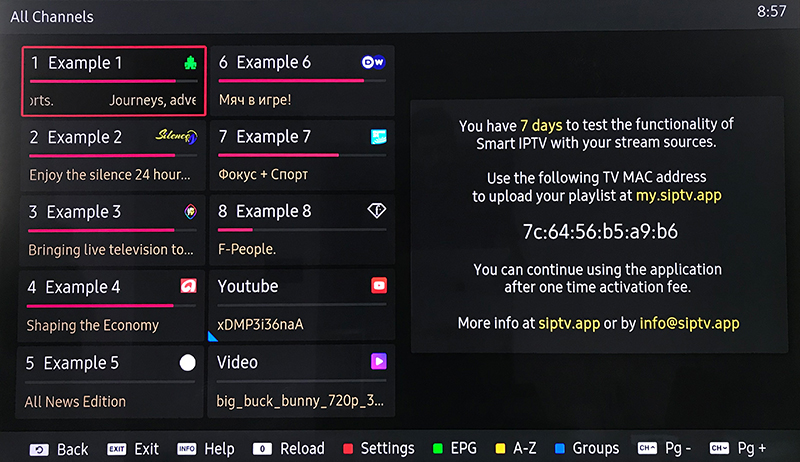
Please note: For the beginning, the App offers you a 7-day free trial. After the App expires, you can obtain it again via in-App microtransaction or visit the website and purchasing the license.
Step 2: After opening the application and you will see your TV Mac address.
Write it down to prepare for the next step.
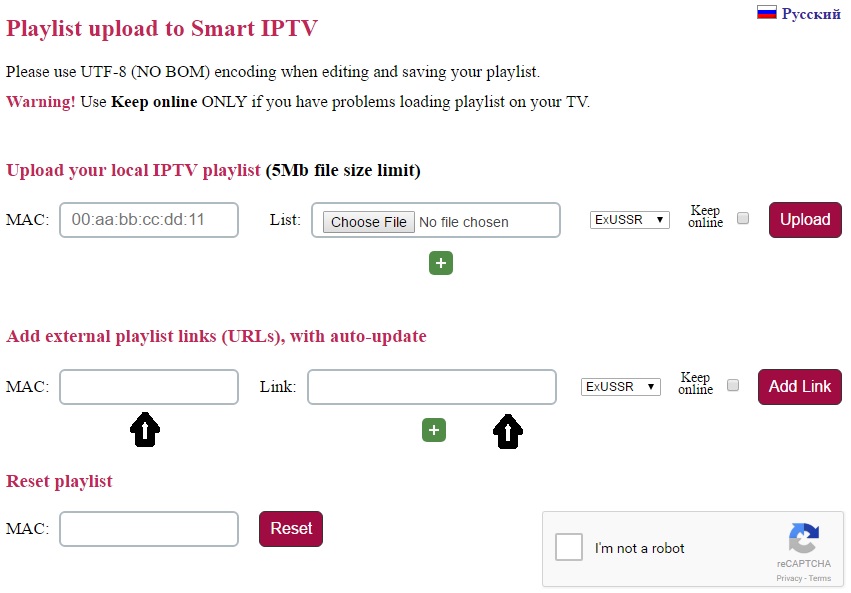
Step 3: Open the playlist uploader web page by opening this URL http://siptv.eu/mylist/
Place your TV Mac address and the M3U URL you received from your IPTV provider, mark “Keep Online” and press “Add Link“.
Better to add M3U link and do not use the Static M3U file to have all new updates.
Note: The progressive IPTV providers give you a dashboard which you can generate and access your M3U url in dashboard.
Step 4: After uploading your playlist successfully, restart the Smart IPTV application and the channels will be displayed.
Enjoy!
How to Troubleshoot SIPTV app?
Password for adult content
For unlocking adult content on your Smart TV application you can try 0000, 1234, or 1122.
Let us know in the comments section below about your opinion and feedback concerning this article and help us improve the quality of our articles. Thank you in advance.
Developed by yestream.net
Stream Seamlessly with yestream
Looking for a zero-buffering IPTV subscription for your device? yestream delivers over 25,000+ live 4K/FHD channels, full beIN Sports, Botola Pro Inwi, Sky Sports, and a 120,000+ VOD library with instant WhatsApp activation.
Stream 25,000+ Channels with Zero Buffering
Get full access to live sports, NFL, NBA, 4K Cinema, and trending TV series in 5–15 minutes with instant activation across all your devices.
Related Tutorials & Guides
How to Install IPTV Smarters Pro on Samsung Smart TV (Tizen OS Guide)
Learn how to install IPTV Smarters Pro directly from the Samsung Smart Hub on Tizen OS without sideloading. Step-by-step guide for Xtream Codes login and regional server configuration.
How to Install IPTV Smarters Pro on LG Smart TV (webOS Guide)
Complete walkthrough on downloading IPTV Smarters Pro on LG webOS Smart TVs via the LG Content Store. Configure Xtream Codes API, load 25,000+ channels, and enjoy 4K HDR live sports.
How to Install and Activate IBO Player on Samsung, LG TV & Firestick
Complete guide to downloading IBO Player on LG webOS, Samsung Tizen, and Fire TV. Learn how to locate your MAC address and Device Key, upload playlists online, and unlock 4K streams.