
What is MAC address on MAG Box?
yestream Engineering
yestream Technical Architecture Desk

MAC, an acronym of Media Access Control address, is a unique feature which identifies device manufacturers’ registered number and will be usable when the device has to be utilized in network environments.
Each MAG device is specified with a particular MAC address that should be registered in the servers of the IPTV provider.
Privileged IPTV providers give you a dashboard to can edit your IPTV subscription, in the dashboard you can Add the MAC.
And if there is not any dashboard, need to contact IPTV provider about this case.
If the users want to change their MAG device, use another MAG device, the new MAC address has to be replaced by the old one in the servers. How to setup IPTV on MAG?
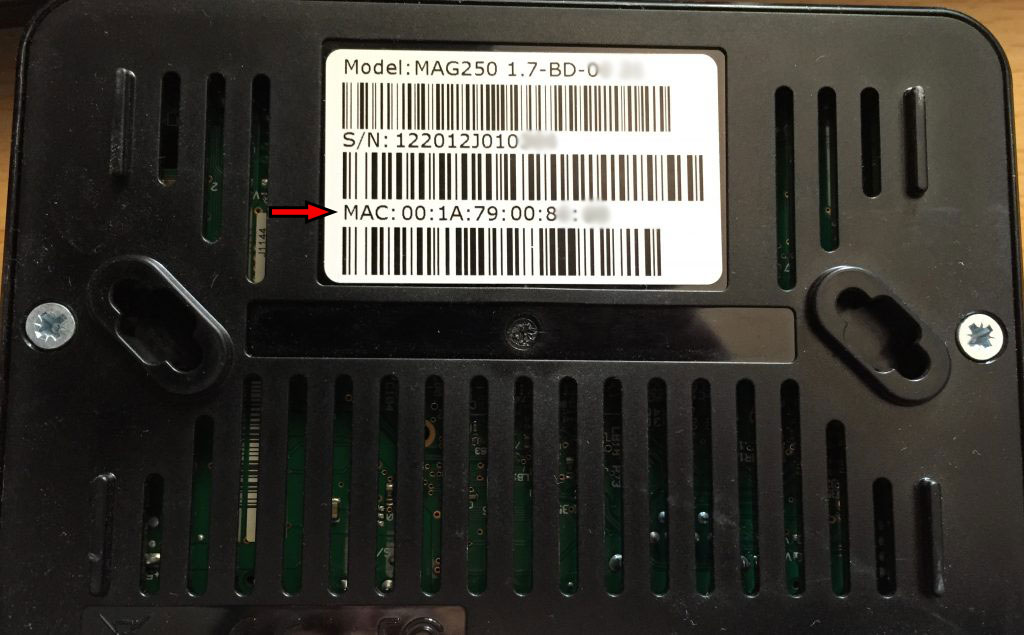
Where to find the MAC address
In order to find the MAC address of your MAG box, simply turn the box around and you can find the MAC address on the backside of your device. The Mac address usually starts with 00:1A:79 and the rest of the numbers and characters are exclusive to each box.
Developed by yestream.net
Stream Seamlessly with yestream
Looking for a zero-buffering IPTV subscription for your device? yestream delivers over 25,000+ live 4K/FHD channels, full beIN Sports, Botola Pro Inwi, Sky Sports, and a 120,000+ VOD library with instant WhatsApp activation.
Stream 25,000+ Channels with Zero Buffering
Get full access to live sports, NFL, NBA, 4K Cinema, and trending TV series in 5–15 minutes with instant activation across all your devices.
Related Tutorials & Guides
How to Stop IPTV Buffering Forever: 9 Proven Fixes for Smooth 4K Streaming
Tired of constant buffering, freezing, or error loops? Follow these 9 proven technical fixes to eliminate stream stuttering on Firestick, Smart TVs, Android boxes, and Wi-Fi networks.
Wired Ethernet vs. 5 GHz Wi-Fi for IPTV: Which Is Best?
When setting up an IPTV service on a Smart TV, Firestick, or Android TV box, achieving a stable connection is critical for smooth, buffer-free streaming. While both Wired Ethernet and 5 GHz Wi-Fi offer more than enough raw speed for 4K and Full HD st
How to Fix IPTV Channels Buffering Only During Peak Hours?
Experiencing smooth, high-quality streams during the day, only for your channels to start buffering, looping, or freezing between 7:00 PM and 11:00 PM, is one of the most common issues with IPTV services. Because this buffering occurs strictly during